Hinglish captions that POP — made on your own PC.
DesiCaps listens to your Reel, writes it the way you speak — “bhai ye trick kamaal ki hai” — and animates every word like the big caption apps. No upload. No subscription. No login.
Hindi + English in one sentence? Samajh gaya.
A Whisper speech model fine-tuned on Indian speech writes Hindi in Roman letters — the way you'd type it on WhatsApp — with each word timed to the millisecond.
DesiCaps writes
Pick a look. Make it yours.
Every style below was rendered by DesiCaps itself. Fonts, colours, outline, shadow, highlight box, pop and entrance animation — all editable.
Fix any word in two seconds.
AI gets you 95% of the way. The editor makes the last 5% painless.
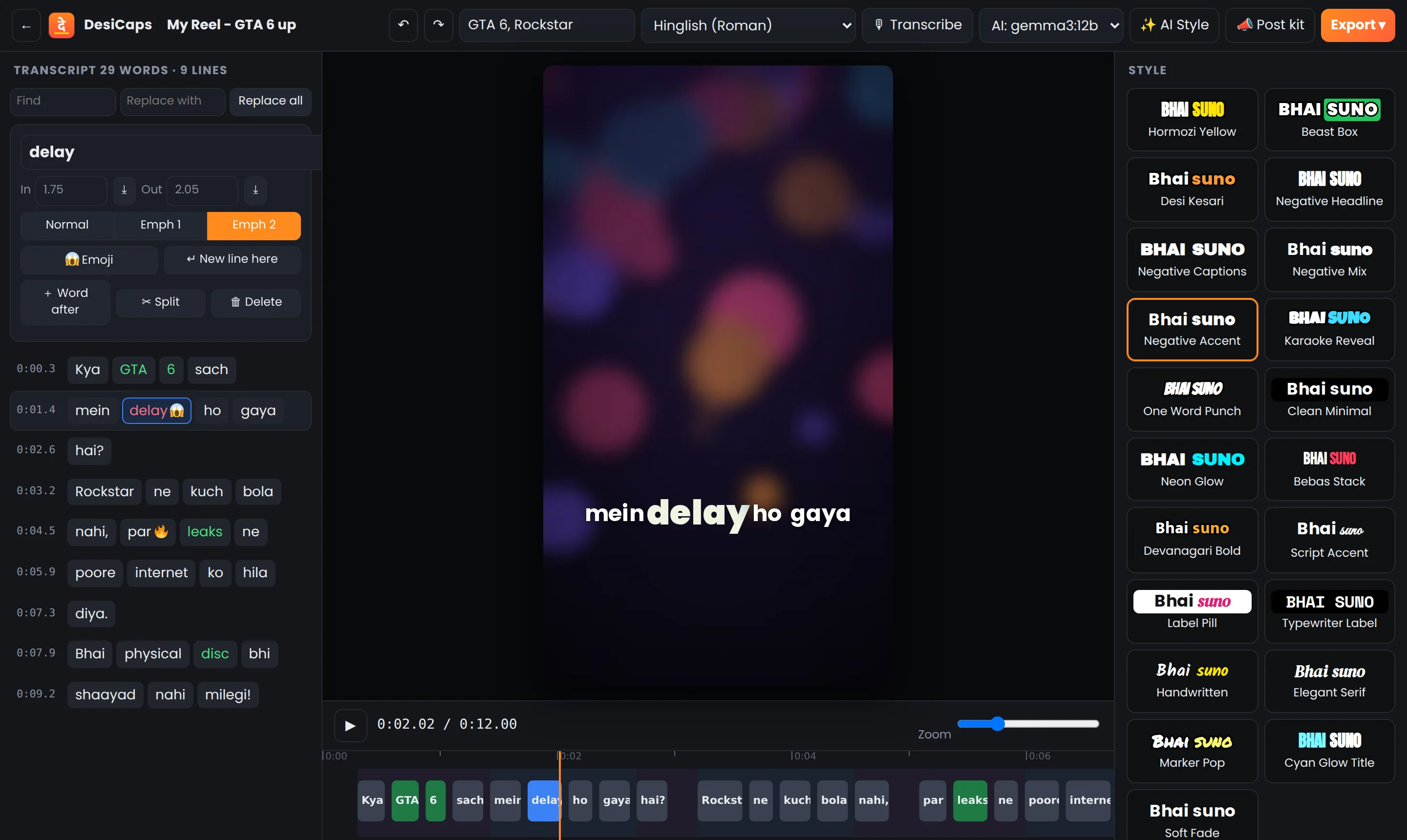
Double-click to retype, colour punch words, add emoji, split or join lines. Find & replace + undo.
What you see is exactly what renders. Drag captions up or down right on the video.
Drag word edges to fix timing to the frame. Zoom in for fast-talking creators.
Pro caption tools. Zero rupees.
Auto Hinglish
Roman-script Hinglish out of the box. Hindi (देवनागरी) and English also available.
GPU fast
NVIDIA, AMD or Intel GPU on Windows; Metal on Apple Silicon. A 1-min Reel in well under a minute.
Word-by-word animation
Active-word highlight, pop, box, karaoke reveal, one-word punch and entrance effects.
After Effects export
Builds native, editable text layers and animations in AE with one script — or skip AE entirely.
MP4 & SRT export
Hardware-accelerated MP4 in full quality (even 4K), plus SRT for YouTube.
Private by design
No account, no cloud, no tracking. Your videos never leave your computer.
AI Style (optional)
Local AI picks the punch words and fitting emoji for you. Runs on your PC via Ollama.
Post kit (optional)
Hook titles, Instagram caption, YouTube title & description and hashtags — in your Hinglish tone.
Raw clip to captioned Reel in about a minute.
Open your video
Vertical or landscape. MP4, MOV or MKV — straight from your phone or camera.
Transcribe
Hinglish words appear with exact timing. Add names like “GTA 6” so they're spelt right.
Style it
Choose a preset, colour the punch words, drop in emoji, drag captions into place.
Export
Render the MP4, send it to After Effects, or grab the SRT. Post it. 🔥
Same wow. None of the catches.
| DesiCaps Studio | Typical online caption apps | |
|---|---|---|
| Price | Free, forever | Monthly subscription for full features |
| Watermark | Never | Often on free plans |
| Your video uploaded to a server | No — stays on your PC | Yes |
| Works without internet | Yes | No |
| Export limits | None | Minutes or exports per month |
| Editable After Effects export | Yes | Rare |
Get DesiCaps — free.
One installer, everything included: the app, the Hinglish speech model, fonts and emoji.
Windows
Recommended for you- Windows 10 or 11, 64-bit
- Any CPU from ~2015 onwards (AVX2) · 8 GB RAM
- GPU acceleration on NVIDIA, AMD & Intel (Vulkan)
- No admin rights needed
Mac
Recommended for you- macOS 12 Monterey or newer
- Apple Silicon: M1, M2, M3, M4 (not Intel Macs)
- GPU acceleration via Metal · 8 GB RAM
- Drag-and-drop install
- Open DesiCaps-Windows-Setup.exe.
- If you see “Windows protected your PC”, click More info → Run anyway.
- Click through the installer. DesiCaps opens automatically when it's done.
- Open DesiCaps-Mac-AppleSilicon.dmg and drag DesiCaps into Applications.
- In Applications, right-click (or Control-click) DesiCaps → Open → Open.
- On macOS 15 or newer, if there's no Open button: System Settings → Privacy & Security → scroll down → Open Anyway.
Why the warning? DesiCaps is free and not signed with a paid Apple/Microsoft developer certificate yet. You only confirm it once. The full source code is public on GitHub.
Questions, answered.
Is it really free? What's the catch?
No catch. DesiCaps runs on your computer, so there are no server costs to pass on to you. It's open source, with no watermark, no limits and no account.
Does it need the internet?
No. Transcription, editing and rendering all work offline. Internet is only used if you choose to download an extra language (Hindi Devanagari / English) or the optional local AI.
How accurate is the Hinglish?
Very good on clear speech, but no AI is perfect. Type names and brand words in the “Names in video” box (e.g. “GTA 6, Rockstar”) and DesiCaps spells them right; anything else takes a double-click to fix.
Will it run on my laptop?
Yes, on most Windows 10/11 PCs from the last ~10 years and any Apple Silicon Mac. A graphics card makes transcription much faster; without one it still works on the CPU, just slower.
Do I need After Effects?
No. DesiCaps renders the finished MP4 itself. The After Effects export is there for editors who want to fine-tune animations in AE.
What are “AI Style” and “Post kit”?
Optional extras powered by a free local AI (Ollama). AI Style colours the punch words and adds emoji; Post kit writes hook titles, captions and hashtags in your Hinglish tone. The app guides you through the one-time setup.
Intel Mac?
Not in this version — the Mac app needs an Apple Silicon (M-series) Mac.
Ready to make your Reels POP?
Free for every creator. Download, drop in a video, and post.