
Tandem for Claude · free · open source · Windows
Several Claude accounts, side by side.
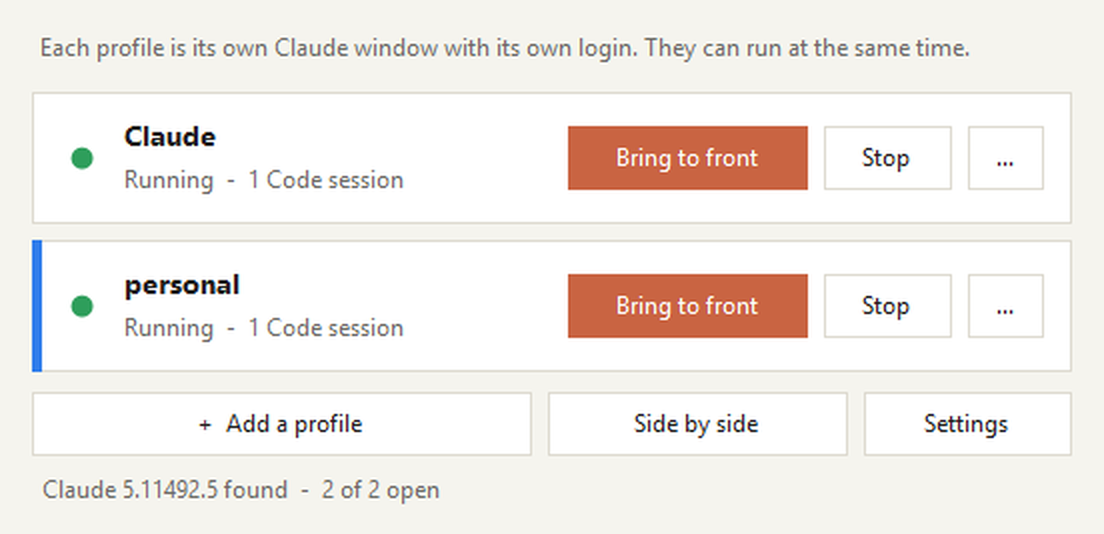
Claude Desktop lets you sign in to one account at a time. Tandem opens it again with a separate login, so your work and personal accounts can both stay open, each in its own window.
How to use it
Put Tandem.exe in a folder where it can stay, for example Documents\Tandem, and double-click it. There is no installer.
- Open Tandem. Your normal Claude is already in the list.
- Click Add a profile and give it a name, such as
personal. - Click Launch. A new Claude window opens. Sign in there with your other account.
From then on both windows open and close on their own. Each profile keeps its own login, chats, settings and Claude Code history.
What it can do
- Launch, bring to front, stop and relaunch each account.
- See what is running, including how many Claude Code sessions each window has.
- A colour border per account, so you can tell the windows apart (Windows 11).
- Side by side: put the open Claude windows next to each other in one click.
- A desktop shortcut per account, and an optional start with Windows.
- A Claude Code terminal per account that uses that profile's settings.
- An optional tray icon with quick access to every profile.
- Rename, add and remove profiles. Removing one from the list never deletes its data.
How it works
There is no trick. For each extra profile, Tandem starts the Claude Desktop you already have installed, with its own data folder. That window keeps its own login and settings, and Claude Code inside it keeps its own memory and history.
Tandem changes nothing in Claude. Your normal Claude starts exactly as before. Tandem's own settings and the extra profiles live in %USERPROFILE%\.tandem.
Good to know
Windows may warn you. The file is not code-signed, so the first time Windows may show "Windows protected your PC". Click More info, then Run anyway. If you would rather not trust a download, you can build it yourself from the source code.
It never goes online. No telemetry, no update check, no account, no licence check.
Use only accounts you are allowed to use. Each account stays subject to Anthropic's terms. Tandem is for people with more than one real account, such as work and personal.
Profiles share nothing. Memory, skills and connectors set up in one profile are not in the other.
Source code and releases
Tandem is free and open source (MIT licence). The code, every release and the build instructions are on GitHub.
Unofficial tool. Not made by, affiliated with or endorsed by Anthropic. "Claude" is a trademark of Anthropic.